 logo
logo

If you are an academic researcher and you have started using Claude Code, GitHub can feel like a huge, messy shelf of tools. There are Claude skills for writing, research, coding, data work, content creation, project planning, and almost everything else. The problem is not finding a skill. The problem is knowing which ones are actually useful for research work.
That is why people search for the best Claude skills on GitHub for academic researchers. They do not want random GitHub repositories. They want skills that can help with real academic tasks like literature review, paper planning, citation checking, PDF reading, table extraction, revision, and maybe data analysis.
A good Claude skill for research should not just make Claude write faster. It should help Claude follow a better research process. Academic work needs sources, structure, careful claims, and review. If a skill only gives polished text but does not help with evidence, citations, or reasoning, it may not be very useful for serious research.
This guide is for researchers, PhD students, graduate students, lab assistants, and academic writers who want to build a useful Claude Code workflow from GitHub skills. Instead of listing every repo, we will group the best options by research task, so you can choose what fits your work.
What Makes a Claude Skill Useful for Academic Research?
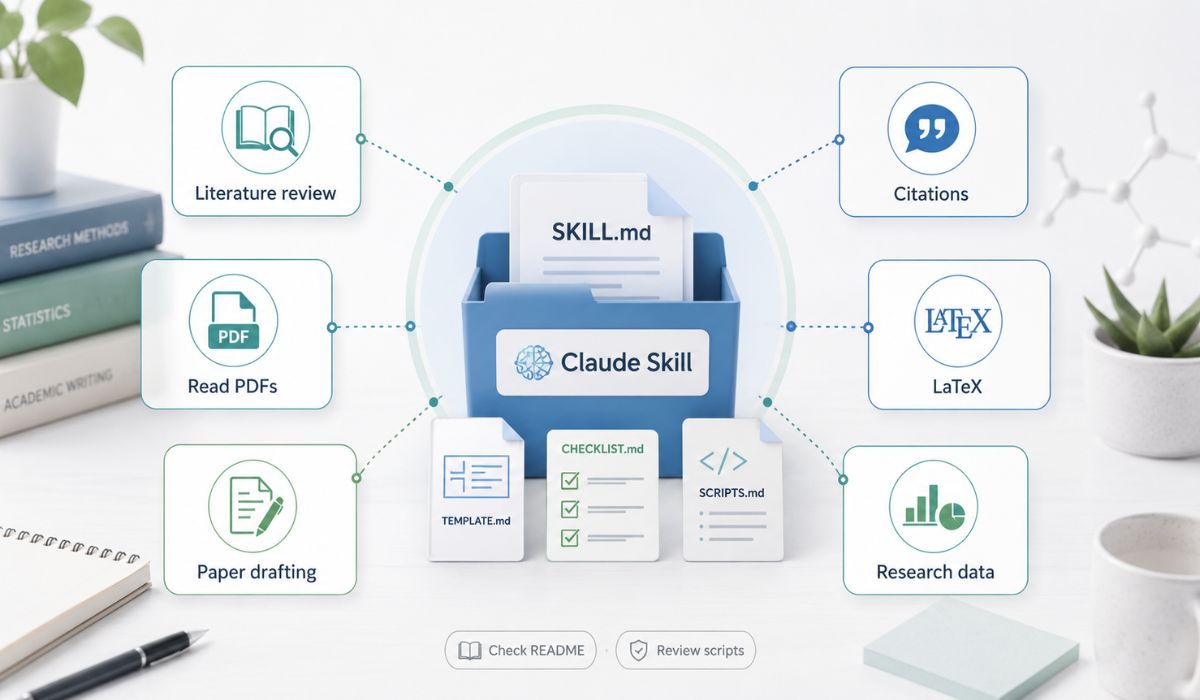 A Claude skill is usually a reusable instruction package. In many GitHub repositories, it appears as a folder named SKILL.md file, and sometimes extra scripts, templates, checklists, or reference files. The point is simple: instead of explaining the same process to Claude repeatedly, the skill provides Claude with a prepared workflow.
For academic researchers, that workflow matters a lot. A normal chatbot answer may be fine for brainstorming, but research work usually needs more control. You may need a literature review process, citation style rules, a paper structure, a review checklist or a way to extract details from papers.
The best Claude skills in GitHub for academic researchers usually help with one of these jobs: finding and organizing papers, reading academic PDFs, drafting paper sections, checking citations, handling LaTeX, reviewing arguments or working with research data.
You should also check the skill before using it. Read the README, open the SKILL.md file and see what instructions it gives Claude. If the repo includes scripts, be more careful. Do not run random code on sensitive research files without understanding what it does.
Best Claude Skill Categories for Academic Researchers
Not every researcher needs the same setup. A humanities researcher writing a theory paper may need writing and revision skills. A biomedical researcher may need literature review and data extraction. A computer science researcher may care more about LaTeX, experiments, and reproducible analysis.
Here is a simple way to think about the main skill categories.
| Skill type | Best for | Why it helps |
|---|---|---|
| Literature review skill | Finding and grouping papers | Helps organize themes and research gaps |
| Academic paper skill | Drafting and revising manuscripts | Keeps paper structure more controlled |
| Citation skill | References and formatting | Reduces cleanup work, but still needs checking |
| PDF extraction skill | Tables, methods and results | Helps pull details from papers |
| LaTeX skill | Technical papers | Helps fix formatting and structure |
| Data analysis skill | Research datasets | Helps clean data and explain results |
| Research note skill | Long projects | Keeps evidence and ideas organized |
This table is not a ranking. It is more like a map. The best skill for you depends on where your research workflow is weakest.
Literature Review and Deep Research Skills
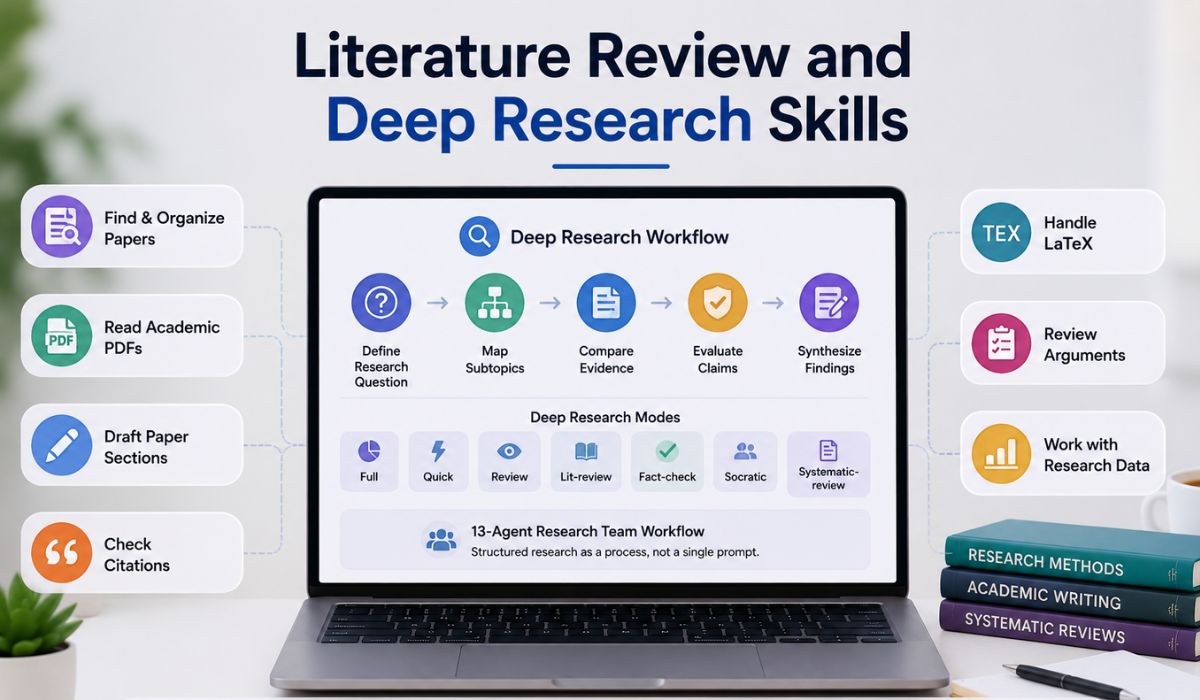 For most academic researchers, literature review skills are the first place to start. A literature review is not just summarizing ten papers. It is about finding patterns, comparing methods, spotting gaps and understanding what the field already knows.
One useful GitHub example is Academic Research Skills for Claude Code. Its repository describes a Deep Research skill with modes like full, quick, review, lit-review, fact-check, socratic, and systematic-review. It also mentions a 13-agent research team workflow, which shows that the repo is trying to structure research as a process rather than a simple chat prompt.
That kind of skill can be useful when you are starting a new research topic. Instead of asking Claude to “summarize papers,” you can push it toward a more organized workflow: define the research question, map subtopics, compare evidence, and separate strong claims from weak ones.
Another useful category is scientific literature review skills. The K-Dense literature review skill is designed for systematic literature reviews, meta-analyses, research syntheses, and searches across sources such as PubMed, arXiv, bioRxiv, and Semantic Scholar. For researchers in science, medicine or technical fields, that kind of direction is more useful than a generic writing assistant.
Still, you should not let any skill replace your own reading. Use it to organize, compare, and plan. Read the important papers yourself.
Academic Paper Writing and Revision Skills
After literature review, the next big need is usually writing. Academic writing is slow because the structure matters. You need a clear introduction, method, argument, results, discussion and conclusion. Even when you know your research well, turning it into a manuscript can be painful.
Some GitHub skills focus directly on academic paper writing. The same Academic Research Skills repo includes an Academic Paper workflow with modes such as plan, outline-only, revision, revision-coach, abstract-only, lit-review and citation-check. It also describes output formats such as Markdown, DOCX, and LaTeX, using tools like Pandoc when available.
That is useful because researchers often need different writing modes. Sometimes you are not ready for a draft. You only need an outline. Sometimes the paper is written but needs a revision pass. Sometimes the abstract is weak. A paper-writing skill can help Claude focus on the right stage.
Another focused repo is Academic Paper Skills for Claude Code, which describes a framework for planning and writing academic papers with strategist and composer skills. This kind of setup may be helpful if you want Claude to separate planning from drafting rather than mixing everything into a single response.
But one thing needs to be clear. These skills can help you draft and revise. They should not invent claims, fake citations or write your final paper without your review. Academic writing still needs the researcher’s judgment.
Scientific Writing and IMRaD Skills
If you write scientific papers, IMRaD structure matters. That means Introduction, Methods, Results and Discussion. Good scientific writing skills can help keep these sections from blending together.
For example, a Methods section should be specific and reproducible. It should not sound like a marketing paragraph. A Results section should report findings without over-explaining. A Discussion section can interpret results, connect them to prior work, and explain limitations.
Scientific-agent style repositories can help here because they are built around science, engineering, analysis and research workflows. The K-Dense scientific-agent-skills repository describes ready-to-use skills for research, science, engineering, analysis, finance, and writing, and says they work with tools including Claude Code.
This kind of skill is most useful when your writing needs discipline. You do not just want better wording. You want Claude to understand what each paper section is supposed to do.
PDF, Table and Data Extraction Skills
A lot of academic work starts with PDFs. You read a paper, then need to pull out sample size, method, variables, dataset, limitations, or results. Doing this manually across many papers can take hours.
PDF and table extraction skills can help Claude focus on structured information. For example, you might ask it to extract all study populations from a set of papers, compare the methods or build a table of datasets and metrics.
This is useful for literature reviews, systematic reviews, and research proposals. Instead of ending up with a messy collection of paper summaries, you can create comparison tables that actually help your argument.
For academic researchers, this type of skill is often more useful than a pure writing skill. Writing comes later. First, you need to understand the evidence.
Just be careful with tables from PDFs. AI can misread numbers or merge columns incorrectly. Always check extracted data against the original paper before using it in a manuscript.
Citation and Reference Skills
Citation skills sound boring until you are near the deadline. Then they become very useful.
A citation-related Claude skill can help format references, convert styles, clean up BibTeX entries, or check whether in-text citations match a reference list. Some writing-focused skill collections describe citation support as part of their research or content workflows.
For academic researchers, citation skills should be treated as helpers, not final authorities. Claude can help you format and organize references, but it can also make mistakes. A wrong author name, fake DOI or mismatched year can create real problems.
The safest workflow is simple: let Claude help clean and structure citations, then verify them in Zotero, Mendeley, EndNote, Google Scholar, or the publisher’s site.
Data Analysis and Visualization Skills
Not every researcher needs data analysis skills, but if you work with datasets, they can be very useful. Claude skills can help guide data cleaning, Python analysis, chart creation and explanation of results.
This is especially helpful when you want a repeatable process. Good analysis should not just produce a chart. It should explain assumptions, show steps and help you keep the work reproducible.
For example, you might use a data analysis skill to clean survey data, summarize missing values, create a figure or explain what a statistical test does. But you still need to check the method. Claude can help, but it is not a replacement for statistical training or supervisor review.
If your research depends heavily on data, choose skills that encourage clear code, saved outputs and transparent assumptions.
How to Choose the Best Claude Skills From GitHub
GitHub has many Claude skills, and not all of them are worth using. Some are well documented. Some are experiments. Some may be outdated. Some may include scripts you should inspect before running.
Use this checklist before installing or copying any skill:
- Read the README and check what the skill is actually built for.
- Open the SKILL.md file and see the instructions Claude will follow.
- Check whether the repo is still maintained.
- Look for examples, usage notes and setup instructions.
- Avoid skills that ask for unnecessary permissions.
- Test on non-sensitive documents first.
- Verify citations, extracted data, and claims manually.
- Prefer skills that fit a single, clear workflow rather than trying to do everything.
This part matters because academic research often includes unpublished ideas, confidential data or work that is not ready to share. Do not upload sensitive material into tools or workflows you do not understand.
A Practical Claude Skills Stack for Researchers
If you are just starting, do not install every skill you find. Build a small stack around your real workflow.
For most academic researchers, a good starting stack looks like this:
- A literature review skill for mapping papers and themes.
- A PDF or table extraction skill for pulling evidence from papers.
- An academic paper skill for outlines, drafts and revisions.
- A citation skill for formatting and reference cleanup.
- A data analysis skill is only required if your project uses datasets.
This is enough for most research workflows. You can always add more later. Too many skills can make your setup harder to manage.
If you are a PhD student, start with the literature review and paper revision. If you are working on a systematic review, prioritize literature review, extraction, and citation skills. If you are writing a conference paper, prioritize academic writing, LaTeX and data visualization.
The best Claude skills on GitHub for academic researchers aren’t always the largest repos. They are the ones that fit your actual research bottleneck.
Mistakes to Avoid
The first mistake is trusting AI-generated citations without checking them. This can damage a paper very quickly. Always verify references.
The second mistake is using Claude skills to avoid reading papers. A skill can summarize, compare and organize, but it cannot replace your own judgment. Serious research still needs careful reading.
Another mistake is uploading private or unpublished data without thinking. If your research includes sensitive interviews, patient data, confidential lab results, or unpublished manuscripts, be careful where you use them.
Also, avoid using too many skills at once. If every task triggers a different workflow, your research process can become more confusing instead of easier.
Commonly Asked FAQs
What are Claude Skills?
Claude Skills are reusable instruction packages that guide Claude through a specific kind of work. They often include a SKILL.md file, and sometimes templates, scripts or reference material.
Are there Claude Skills for academic research on GitHub?
Yes. GitHub has skills and repositories focused on academic research, literature reviews, scientific writing, paper planning, and research workflows.
Can Claude Skills help with literature reviews?
Yes, they can help organize papers, summarize themes, compare methods and build review structures. You still need to verify sources and read key papers yourself.
Are Claude’s skills safe for unpublished research?
They can be useful, but be careful. Do not use unknown scripts or upload sensitive unpublished data unless you understand the tool and privacy risk.
Which Claude Skill should researchers start with?
Most researchers should start with a literature review skill or an academic paper skill. Those usually solve the most common research problems first.
Final Thoughts
The best Claude skills in GitHub for academic researchers are the ones that match real academic work. For many people, that means literature review, academic paper writing, PDF extraction, citation cleanup and data analysis.
Do not choose skills only because a repo looks big or popular. Choose based on your workflow. If your biggest problem is finding and organizing papers, start with literature review skills. If your draft is messy, use academic paper and revision skills. If your data work is slow, add analysis and visualization skills.
Claude skills can save time, but they should support your research thinking, not replace it. The best setup is the one that helps you read better, organize evidence more clearly and write with more control.
