 logo
logo
Reading a full script can take more time than people expect. A five-minute video script may be easy to scan, but a long YouTube script, podcast script, webinar draft, or client video script can quickly become tiring. You may only need the main idea, key points or weak sections, but you still end up reading everything from top to bottom.
That is where good ChatGPT prompts can help. The right prompt can turn a long script into a clean summary in minutes. But the prompt matters. If you only say “summarize this,” ChatGPT may give you a basic summary that misses the reason you needed it in the first place.
This guide covers the 5 best ChatGPT prompts for script summaries to reduce time spent reviewing scripts. It is useful for YouTubers, content writers, video editors, marketers, students, and anyone who needs to understand a script quickly without losing the main message.
Why ChatGPT Prompts Matter for Script Summary
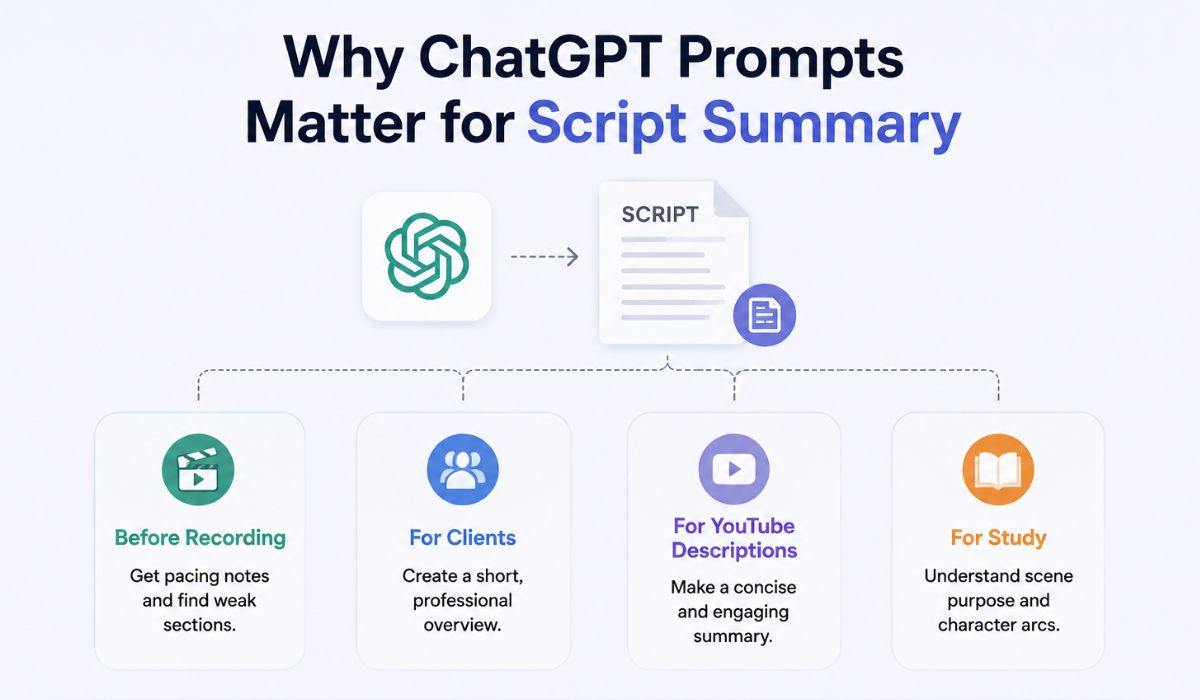 ChatGPT can summarize almost any script, but it performs better when you specify the kind of summary you want. A summary for a video editor is not the same as a summary for a client. A summary for a YouTube description is also different from a scene-by-scene breakdown.
For example, if you are checking a script before recording, you may want pacing notes and weak sections. If you are sending a summary to a client, you may want a short professional overview. If you are studying a film script, you may need to consider the scene’s purpose and the characters’ movements.
So before using ChatGPT, decide what you want the summary to do. Do you want to save reading time, review structure, find weak parts or explain the script to someone else? Once that is clear, the prompt becomes much easier.
Quick Guide: Which Script Summary Prompt Should You Use?
Not every script needs the same prompt. A short video script may only need a quick summary, while a detailed training script may need section-by-section notes. This table helps you choose the right prompt before copying anything.
| Prompt Type | Best For | Output Style |
|---|---|---|
| Quick summary prompt | Fast review | 3-5 bullet points |
| Detailed breakdown prompt | Long scripts | Sections and key ideas |
| Scene-by-scene prompt | Film, video or podcast scripts | Scene or segment notes |
| Executive summary prompt | Clients or teams | Short professional overview |
| Editing notes prompt | Improving script quality | Summary plus suggestions |
If you are not sure where to start, use the quick summary prompt first. After that, you can ask ChatGPT for a deeper breakdown if the script needs more review.
Prompt 1: Quick Script Summary Prompt
This prompt is best when you do not want to read the full script right now. Maybe someone sent you a draft and you only need to understand the main idea before giving feedback. Or maybe you have your own script and want to check whether the message is clear.
Use this prompt:
Summarize this script in 5 bullet points. Focus on the main idea, key message, important moments and final takeaway. Keep it simple and easy to understand.
Script:
[Paste your script here]
This prompt works because it gives ChatGPT a clear output style. It asks for 5 bullet points, so the summary stays short. It also tells ChatGPT what to focus on, which helps avoid random details.
Example use case:
You have a 1,500-word YouTube script and want to know if the main idea is clear. Instead of reading the whole thing again, paste it into ChatGPT and use this prompt. The result should give you a fast overview of what the script is really saying.
Prompt 2: Detailed Script Breakdown Prompt
Some scripts are too long for a quick summary. If the script has several sections, examples, arguments or teaching points, a detailed breakdown works better. This is useful for educational videos, webinars, training content and long YouTube scripts.
Use this prompt:
Read this script and create a detailed breakdown. Divide it into logical sections, summarize each section, list the main points and explain the overall message of the script.
Script:
[Paste your script here]
This prompt is good because it does not force ChatGPT to treat the whole script as one block. Instead, it asks for sections. That makes the output easier to review.
For example, if your script has an intro, problem section, tutorial steps, examples and conclusion, ChatGPT can separate them. You can then quickly see whether the structure makes sense or whether one section is too long.
This saves time because you are not just getting a summary. You are getting a map of the script.
Prompt 3: Scene-by-Scene or Segment Summary Prompt
Some scripts are not written like normal articles. A film script, podcast script, interview script or video script may have scenes, speakers, camera notes or time-based segments. In that case, a normal summary may be too flat.
Use this prompt:
Summarize this script scene by scene or segment by segment. For each scene or segment, explain what happens, why it matters and what the audience should understand from it.
Script:
[Paste your script here]
This prompt is useful when the order of the script matters. A scene-by-scene summary helps you see how the story or message moves from one part to the next.
For a podcast, you can use it to summarize each topic segment. A short film can show what each scene adds to the story. A YouTube video can help you check whether the script flows naturally from hook to ending.
If ChatGPT gives too much detail, add this line:
Keep each scene summary under 2 sentences.
That keeps the output short and saves even more time.
Prompt 4: Executive Summary Prompt for Clients or Teams
Sometimes you do not need a creative breakdown. You need a clean summary to send to a client, manager, editor or team member. This type of summary should be short, professional and easy to scan.
Use this prompt:
Create a short executive summary of this script for a client or team member. Include the topic, target audience, main message, tone and expected viewer takeaway. Keep it under 150 words.
Script:
[Paste your script here]
This prompt is helpful for marketing scripts, brand videos, sales videos and agency work. Instead of sending the whole script to someone busy, you can send a clear summary first.
For example, if your team is reviewing three video scripts, this prompt can create a short summary for each one. Then the team can decide which scripts need full review and which ones are already clear.
It reduces time because not everyone needs to read every word of the script at the first stage.
Prompt 5: Script Editing Notes Summary Prompt
This is probably the most useful prompt if your goal is not only to summarize the script but also improve it. It tells ChatGPT to look for weak areas, pacing issues and unclear parts.
Use this prompt:
Summarize this script and give editing notes. Include the main idea, strongest parts, weak sections, pacing issues, unclear points and suggestions to improve the script. Do not rewrite the full script unless I ask.
Script:
[Paste your script here]
This prompt saves time because it combines summary and review. Instead of asking one question for a summary and another question for feedback, you get both in one response.
A good output from this prompt should include:
- Main summary
- Strongest parts
- Weak or unclear sections
- Pacing problems
- Missing details
- Improvement suggestions
This is useful before recording a video or sending a script to a client. It can catch problems early, especially when the intro is too slow, the ending is weak or the call to action does not fit.
How to Get Better Script Summaries From ChatGPT
The prompt is important, but the way you paste the script also matters. If your script is messy, ChatGPT may still summarize it, but the result may not be clean.
Try these simple tips:
- Tell ChatGPT the script type, like YouTube video, podcast, ad, film or webinar.
- Mention who the summary is for, such as editor, client, student or team.
- Set the length before it writes, like 5 bullets or under 150 words.
- Ask for sections if the script is long.
- Tell ChatGPT not to rewrite the full script unless you need that.
- If the script is too long, paste it in parts and ask for a final combined summary.
One small detail helps a lot: always mention the goal. If your goal is fast review, say that. If your goal is editing feedback, say that. ChatGPT works better when it knows how the summary will be used.
Common Mistakes When Using ChatGPT for Script Summary
The biggest mistake is using a vague prompt like “summarize this.” It works, but the output is often too general. You may get a summary that sounds fine, but does not help with editing, client review or time-saving.
Another mistake is asking for a long summary when you are trying to save time. If the output is almost as long as the original script, it defeats the purpose. For a quick review, ask for bullet points. For professional sharing, ask for an executive summary.
Also, be careful with private or client scripts. If a script is confidential, do not paste it into ChatGPT unless you have permission and you are comfortable sharing it. You can remove names, brand details or private information before using the prompt.
Commonly Asked FAQs
What is the best ChatGPT prompt for script summary?
The best simple prompt is: “Summarize this script in 5 bullet points. Focus on the main idea, key message, important moments, and final takeaway.”
Can ChatGPT summarize a long video script?
Yes, ChatGPT can summarize long video scripts. For better results, ask it to divide the script into sections and summarize each part.
Can ChatGPT summarize a script scene by scene?
Yes. Use a scene-by-scene prompt and ask ChatGPT to explain what happens, why each scene matters, and what the audience should understand.
How do I make a ChatGPT summary shorter?
Tell ChatGPT the exact length. For example, ask for “5 bullet points,” “under 100 words,” or “one short paragraph.”
Final Thoughts
The 5 best ChatGPT prompts for script summary examples to reduce time spent on all work for different needs. Use the quick summary prompt when you only need the main idea. Use the detailed breakdown prompt for long scripts. Use scene-by-scene summary for film, podcast or segmented content.
If you work with clients or teams, the executive summary prompt is better. If you want to improve the script, use the editing notes prompt. The best prompt is not always the longest one. It is the one that matches your purpose.
What type of script do you usually summarize most often, YouTube scripts, podcast scripts, ads or short films?
