 logo
logo

Multilogin is a strong choice for teams scaling Instagram accounts because it brings Android cloud phones, browser profiles, built-in residential proxies, team controls, and automation support into one dashboard. GeeLark offers ready-made automation, while DuoPlus and VMOS Cloud are additional cloud phone options to compare.
Compare what each plan includes: mobile usage, proxy traffic, saved app data, bulk actions, team access, and automation. These factors affect how well a service fits your Instagram workflow.
Cloud phone pricing comparison for Instagram
Multilogin offers the most complete bundled pricing, while GeeLark, DuoPlus, and VMOS Cloud use more variable device- or usage-based pricing.
|
Platform |
Starting price |
Cloud-phone usage |
Proxies |
Browser profiles |
Best for |
| Multilogin | Free plan; paid from $7.08/month | Minutes included in every plan (30 one-time minutes on Free) | Residential and mobile, included in every plan | Yes | Teams running mobile and web accounts with proxies and team controls in one platform |
| GeeLark | Free plan; paid from $5/month | $0.007/minute, $1.20 daily cap per device, or $29.90/device monthly rental | Not included | Yes | Ready-made RPA and synchronization |
| DuoPlus | Free trial; from ~$2/device/month | From $0.0042/minute; monthly startup option | Not included (SOCKS5) | No | Low device-entry cost, bulk control, optional SMS numbers |
| VMOS Cloud | From $0.11/day; some 30-day plans from $4.99 | Device and plan dependent | Third-party | No | Low-cost Android access and testing |
The prices are not directly equivalent. Multilogin packages profiles, proxy traffic, and mobile minutes into subscription plans. GeeLark and DuoPlus separate some platform, device, and runtime costs. VMOS Cloud prices vary by device tier and rental model.
1. Multilogin: Best overall for scaling and managing multiple Instagram accounts
Multilogin is the strongest overall option for agencies and social media marketers managing multiple Instagram profiles.
Each mobile profile runs on a dedicated Android cloud phone with its own apps, app data, location, IP, and persistent session. Web workflows can run in isolated browser profiles with separate cookies, sessions, and IP addresses. Teams manage both from one dashboard.
Key features include:
- Android cloud phones for the native Instagram app
- Isolated browser profiles for web workflows
- Built-in residential proxies
- Persistent apps and login sessions
- More than 30 Android device types across 12 brands
- Folders, tags, notes, and custom columns
- Profile sharing and role-based permissions
- API, ADB, Selenium, Puppeteer, Playwright, and Postman support
- Bulk profile management
- 24/7 customer support
The Multilogin pricing starts with a Free plan that has no time limit and requires no credit card. It includes five profiles in total, 200 MB of one-time proxy traffic, and 30 one-time mobile minutes. Paid plans start from $7.08 per month and add monthly proxy traffic, mobile minutes, API access, and team features.
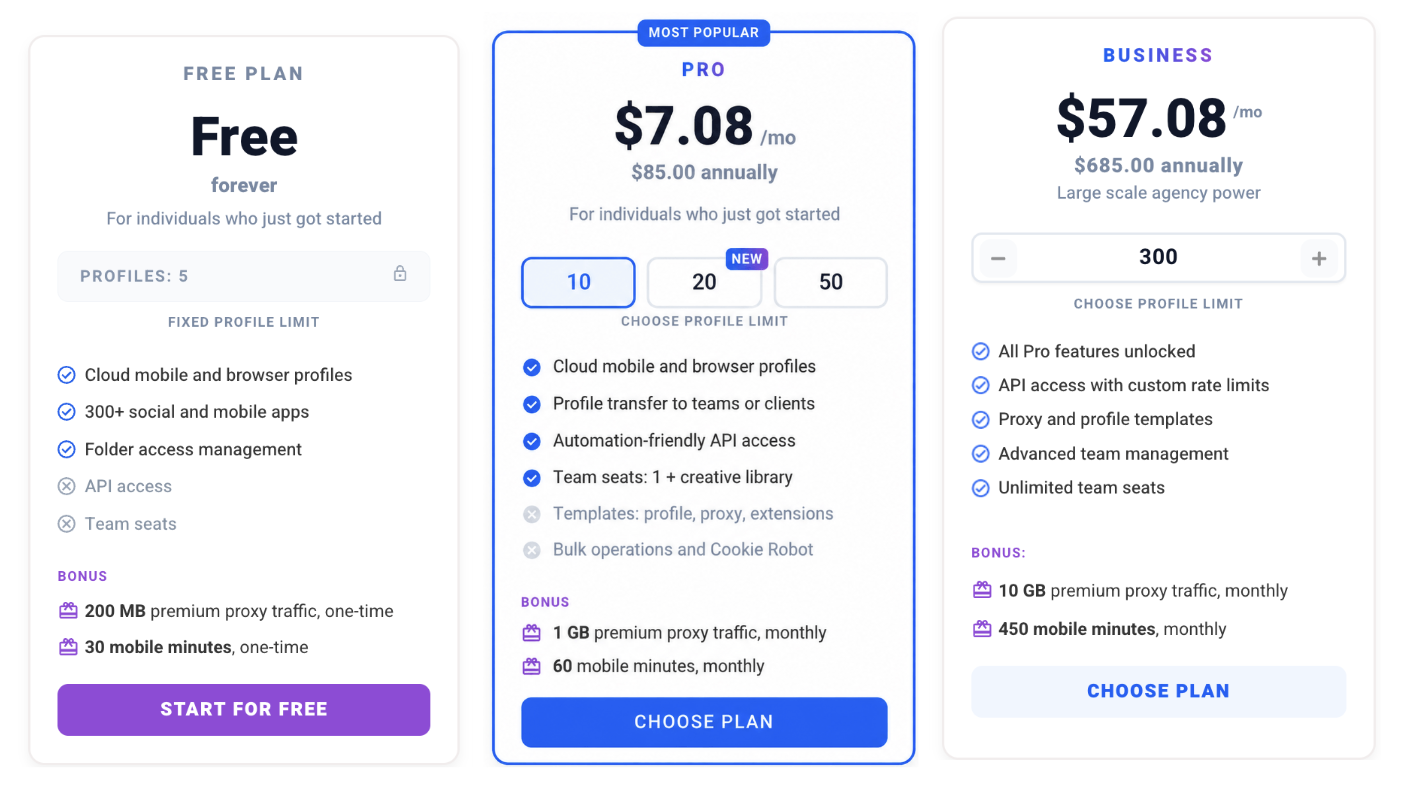
Multilogin is especially useful when an agency needs to manage Instagram through the native app while retaining browser access for related web tasks.
Best for: Agencies, marketers, creators, and AI workflow builders that want mobile profiles, browser profiles, proxies, and team controls in one platform.
2. GeeLark: Best for ready-made Instagram automation
GeeLark provides Android cloud phones, proxy management, team collaboration, RPA templates, and on eligible paid plans an API, ADB access, and a synchronizer for repeating actions across devices.
Its Free plan includes two profiles and 30 bonus minutes. Standard cloud-phone use costs $0.007 per minute, with a daily usage cap of $1.20 per device.
For regular use, monthly cloud-phone rental costs $29.90 per device and includes unlimited minutes during the rental period.
GeeLark separates the workspace subscription from some phone-runtime costs. This gives teams several ways to pay, but it also means the final cost depends on the plan, minutes, rentals, and number of phones running simultaneously.
Best for: Teams that want ready-made RPA workflows, synchronization, and flexible usage-based billing.
3. DuoPlus: Best for flexible runtime pricing
DuoPlus offers Android cloud phones with RPA, operation synchronization, API access, ADB, proxy management, team collaboration, bulk app controls, and cloud storage management.
The Free trial includes one cloud phone for 30 days and 30 minutes of temporary startup time. Its help center lists cloud phones from approximately $2 per device per month. Runtime is charged separately, with the pricing page listing startup packages from $0.0042 per minute. A monthly startup option is also available for teams that use their phones more frequently.
DuoPlus also offers Cloud Number as a separate product for receiving SMS. This is important because a cloud phone does not automatically include a unique telephone number. Teams should confirm the availability, supported services, countries, and separate cost of numbers before including them in an Instagram workflow.
Best for: Teams that want low device-entry costs, temporary runtime billing, bulk operations, and optional phone-number services.
4. VMOS Cloud: best for low-cost Android access
VMOS Cloud offers remotely hosted Android environments for social media management, automation, app testing, and other mobile workflows.
Its pricing page lists selected cloud machines from $0.11 per day, while higher-specification devices cost more. VMOS Cloud also advertises some 30-day cloud-phone subscriptions from $4.99. The final price depends on the Android environment, hardware tier, rental duration, runtime model, and any proxy or verification services added.
VMOS Cloud can be economical for testing or maintaining simple mobile environments. However, agencies should confirm team permissions, proxy pricing, automation support, and bulk-management requirements before comparing its device price with bundled platforms.
Best for: Budget-conscious users who primarily need remote Android environments and are comfortable assembling other workflow components separately.
What cloud phone features matter for Instagram automation?
The most important features are persistent Android environments, stable app data, individual network configurations, access controls, and supported automation methods.
For professional Instagram management, look for:
- Persistent app data: Instagram, login states, cache, and settings should remain available between sessions.
- Dedicated environments: Each client account should have a clearly assigned cloud phone.
- Proxy support: Confirm whether proxy traffic is included or requires a separate purchase.
- Bulk controls: Agencies may need to create, start, stop, tag, or assign several phones efficiently.
- Team permissions: Operators should access only the profiles required for their role.
- Automation access: API and ADB are useful for custom workflows. RPA and synchronizers can suit teams that prefer visual automation.
- Usage transparency: Compare subscription prices, phone rentals, runtime, proxy traffic, storage, team seats, and add-ons.
- Account recovery planning: Keep recovery details and ownership records under the client’s control.
Automation should support repetitive administrative work, not spam-like behavior. Fast, identical activity across many accounts can still trigger reviews or enforcement.
How to choose a cloud phone for Instagram growth
Choose the platform based on the complete workflow rather than the lowest advertised device price.
- Count how many Instagram profiles need mobile access.
- Estimate how many minutes each cloud phone will run monthly.
- Decide whether every profile needs a separate proxy.
- Check whether the team needs browser profiles as well as Android cloud phones.
- Identify required automation methods, such as API, ADB, RPA, or a synchronizer.
- Confirm team-seat limits and permission controls.
- Calculate the total monthly cost, including runtime, proxies, numbers, storage, and automation.
- Test a small number of profiles before expanding the workflow.
What are the downsides of cloud phones?
Cloud phones depend on a reliable internet connection. Slow or unstable connections can affect screen responsiveness and upload performance. They also introduce recurring costs for device access, runtime, proxies, or storage.
Another limitation is that a cloud phone does not automatically provide a unique mobile number. Multilogin cloud phones can’t receive SMS or calls, so Instagram verification codes need a separate number. Some providers, such as DuoPlus, sell SMS numbers as separate products with their own regional coverage and costs. On Multilogin’s free plan, profiles are deleted after 7 days of inactivity, and proxy traffic and mobile minutes don’t renew.
Frequently asked questions
What is the best cloud phone for Instagram scaling?
Multilogin is the best overall choice for professional Instagram scaling because it combines Android cloud phones, browser profiles, built-in residential proxies, automation support, and team controls. GeeLark is a good alternative for teams prioritizing ready-made RPA and synchronization.
Which cloud phone platform handles multiple Instagram accounts?
Multilogin, GeeLark, DuoPlus, and VMOS Cloud can all run multiple Android environments for Instagram. Multilogin is the only platform that includes cloud phones, browser profiles, residential proxies, and mobile minutes in all plans, which makes it the most complete option for teams that also need profile sharing and role-based permissions.
Can a cloud phone prevent Instagram account bans?
No. No cloud phone can guarantee that Instagram will not review, restrict, or disable an account. Account outcomes also depend on content, behavior, ownership, engagement, and compliance with Instagram’s rules.
Multilogin is not a way around platform rules. The safest approach combines clean account separation with original content, real engagement, and platform-compliant activity.
What is the best cloud phone for a small business managing several Instagram accounts?
For a small business that needs both mobile and web workflows, Multilogin is a practical starting point because it has a Free plan and paid plans from $7.08 per month. Businesses that only require occasional Android access may prefer usage-based options from GeeLark, DuoPlus, or VMOS Cloud.
What phone is best for Instagram?
For content creation, camera quality, stabilization, and editing support matter most. For managing multiple existing Instagram profiles, consistent account environments and operational controls matter more than choosing a particular consumer phone model.
Final verdict
Multilogin is the best overall cloud phone platform for scaling Instagram accounts in 2026. It brings Android cloud phones, browser profiles, built-in residential proxies, automation, and team management into one workspace.
GeeLark is the strongest alternative for ready-made automation. DuoPlus offers flexible device and runtime pricing, while VMOS Cloud provides a low-cost route to remote Android access.
Compare total operating cost rather than the advertised entry price. Runtime, proxy traffic, team seats, automation, and optional phone numbers can materially change what each platform costs at scale.
